Saturday, February 7, 2015

Add custom script to Nintex forms

Share/Save/Bookmark

At the end of this blog post you will learn how to

- Submit data to mulitple lists from a single form(here Nintex)
- Create a new item using client side script(Jquery)
- Have your own code/javascript run when submitting the OOTB submit/save button
- Add custom script or jquery in Nintex forms accessing controls


NWF$(document).ready(function () {

var formclick = $("input[commandtype*='Save']").attr("onclick");
formclick = "if(!UpdateContacts()){return false;};" + formclick.replace("javascript:","");
$("input[commandtype*='Save']").attr("onclick",formclick);

});

Above function will bind custom script/function to the OOB save/submit button on the Nintex form but for some reason i could not get the client validation happen before the submit works.

function UpdateContacts()
{

 mode = "New";
 var aname = $('#'+accountnameCtrl).val();
 var fn = $('#'+firstnameCtrl).val();
 var ln = $('#'+lastnameCtrl).val();
 var email = $('#'+emailCtrl).val();
 var phone = $('#'+phoneCtrl).val();

  $().SPServices({
        operation: "UpdateListItems",
        async: false,
        batchCmd: "New",
        listName: "Contacts",
        valuepairs: [["FirstName", fn],["LastName", ln],["Phone",phone],["Email",email]],
        completefunc: function(xData, Status) {
        console.log(status);

    $(xData.responseXML).find("ErrorText").each(function() {
     alert("Error :"+$(this).text());
    });
    }

});

}


Subscribe

Batch update list items using client scripts

Share/Save/Bookmark
We know that SPServices has a way to create new or update items but when in the case of creating multiple items(say 10), calling the same query 10 times is not going to be good from performance perspective. so lets use batch command to do it from client side as below

var query_string = "";
for(int i=1;i<=5;i++)
{
var title = $('input#title'+i).val();
var desc = $('input#desc'+i).val();
query_string += "<Method ID='1' Cmd='New'>";
query_string += "<Field Name='Title'>"+title+"</Field>";
query_string += "<Field Name='Description'>"+desc+"</Field>";
query_string += "</Method>";

}
query_string += "
";

$().SPServices({
    operation: "UpdateListItems",
    async: false,
    batchCmd="New",
    listName: "Requests",
    updates: query_string,
    completefunc: function(xData, Status) {
        alert(xData.responseText);
    }
});

for update operations, batchCmd should be updated as 'Update' and same in the query string as well.


Subscribe

Sunday, October 19, 2014

Calculate days difference in Dataview webpart

Share/Save/Bookmark

To calculate days difference from 2 date time type fields in XSLT, hidden function DateTimeTick from ddwrt can be used as below,

number((number(ddrwt:DateTimeTick(string(@MeetingStartDate))) - number(ddwrt:DateTimeTick(string(@MeetingEndDate )))) div 864000000000)

 Subscribe

Handle case insensitive in XSLT

Share/Save/Bookmark

We may be looking for functions like ToUpper or ToLower but Translate is the function given in  XSLT.

<xsl:variable name="lowercase" select="'abcdefghijklmnopqrstuvwxyz'" />
<xsl:variable name="uppercase" select="'ABCDEFGHIJKLMNOPQRSTUVWXYZ'" />
<xsl:variable name ="Rows" select="/dsQueryResponse/Rows/Row[contains(translate(@UserName,$uppercase,$lowercase),'smith')]" /> 

Do not forget to include single quotes for lowercase/uppercase variables.


Subscribe

Form was customized not working with attachment


Share/Save/Bookmark

Are you troubled with this error? then 99% of chance that you have done something very similar to what i did, building a custom list form(new/edit) where custom list form(dataform)  webpart is added. Also, i believe this is happen to be in only in SharePoint 2007(did not test in 2010/2013).

So when a custom list form webpart is added in the sharepoint designer, it supposed to work as is without any customizations but attachment functionality is broken as it was never completely built. MSFT has released a fix for it. There is a XSLT code snippet you need to copy from here to get this fixed, its pretty straightforward.


Subscribe

Thursday, June 12, 2014

Check in file using Client script


Share/Save/Bookmark

Here is a simple way of doing few file operations in sharepoint using client script. You can try JQuery for client object model or CSOM or JQuery with SPServices(in my case).

function DiscardCheckOut(url)
{

    var errorMessage = "";

    $().SPServices({
    operation: "UndoCheckOut",
    async: false,
    pageUrl: url,
    completefunc: function (xData, Status) {
         $(xData.responseXML).find("errorstring").each(function() {
         errorMessage = $(this).text();
         });

        $(xData.responseXML).find("faultstring").each(function() {
               errorMessage += $(this).text();
         });

        var undoCheckOutVal= $(xData.responseXML).find("UndoCheckOutResult").text();
        if(undoCheckOutVal == "true")
             alert("Operation success");
        else
            alert("Operation failed:"+errorMessage);
     }
});

}

function CheckIn(furl)
{

   var errorMessage = "";

   $().SPServices({
   operation: "CheckInFile",
   async: false,
   pageUrl: furl,
   comment': "Checked in from checkout list",
   CheckinType: 1,
   completefunc: function (xData, Status) {
       //get errorstring
        $(xData.responseXML).find("errorstring").each(function() {
             message = $(this).text();
        });

       //get fault string
       $(xData.responseXML).find("faultstring").each(function() {
            message +=" "+ $(this).text();
       });

      var checkInResultVal= $(xData.responseXML).find("CheckInFileResult").text();
      if(checkInResultVal == "true")
            alert("Check-in operation success");
      else
            alert("Operation failed:"+errorMessage);
   }
   });
}


Subscribe

Ribbon Tab with id: "Ribbon.Read" has not been made available for this page or does not exist. Use Ribbon.MakeTabAvailable()

Share/Save/Bookmark

‘The Ribbon Tab with id: "Ribbon.Read" has not been made available for this page or does not exist. Use Ribbon.MakeTabAvailable()’

Have you seen that crazy error on your page? Don't worry its not your fault but a riddle left by MSFT. I'm certain that you got this error when playing with wiki pages. Yes, if wiki pages are rendered in IFrame or wiki page url has IsDlg=1(as part of querystring) this error shows up in sharepoint logs. As a quick around you can change the type of the page from wiki to webpart. But, if you are reluctant to do so then jump to a custom solution for a fix.
 
Subscribe

List Checkout documents using search

Share/Save/Bookmark

Today im gonna show you an easiest OOTB approach using search(with no coding) to list/display all checked out documents(across webapp/site collections) to current user. Based on the result sources/content source configured on sharepoint farm, search query can be run on wider scope of data.

Configure content search webpart with the below query(copy paste in query text box) in advanced mode. 

 CheckoutUserOWSUSER:{User.Name} {contentclass:STSListItem OR IsDocument:True}

Subscribe

List shared with me in SkyDrive

Share/Save/Bookmark

Skydrive does seems to have a feature, shared with me that will allow users to see all the documents shared only with them. This is available only in office365/cloud version of sharepoint and is not with Sharepoint on-premise.

When digging into on-premise mysite features, found a page,sharedwithme.aspx under personal/ADid/documents/forms. Here, documents is nothing but a special library used for skydrive for the user. This library will have all the documents added by you and shared with you or by others. Sharedwithme.aspx(acting like a view) will show the documents shared with current user. Looking at the view, with missing values for the columns(shared by/modified) and column header mismatch with actual datatable its easy to say that this feature is not completely functional. I'm not sure if this is ever meant to be found or working. Also, there is no OOTB way to have the left navigation link for sharedwithme view. Though, this can be added using jquery but a lot of work(not sure how far feasible) need to be done to the OOTB sharedwithme webpart used on this view. So, i changed the strategy and built it using content search webpart.Below is the search query i used to configure content search webpart to fetch all shared items with current user.

IsMyDocuments:1 IsDocument -Author:{User.Name} -SharedWithInternal:"NT AUTHORITY\Authenticated Users"

IsMyDocuments is used to identify all documents from skydrive(mydocuments). Above query will filter out all the documents authored by current user and show only shared with him/her.

Few weeks after this implementation, MS has released OneDrive for business. I did'nt get a chance to review its features but worth to look at it before doing this.

Subscribe

Thursday, May 29, 2014

Understand & Customize Display Templates


Display templates are new in sharepoint 2013 replacing XSLT in 2010 which will be used to customize the UI/display of the webparts. Like, we had item.xsl and control.xsl back then, its same strategy in 2013 as well. Entire UI code for a webpart is split into 2 different files, Control and item template. Control template will have the markup that creates the base look/container/header section for the webpart where as item template will  have the markup defined for each result/item displayed.

For every display template(item/control) file(.html) uploaded to the master page gallery, a respective js file will be generated if no syntax errors found. Publishing features at site collection need to be activated so sharepoint could generate those files.

To start with creating a custom item template, copy any of the OOTB template and start following its pattern and conventions. I have explained few notations to make it easy for you and myself.

Ensure all the changes are written inside the first div under the body of the template. Sharepoint reads only the markup which is inside the first div(excluding div element itself) while applying the item template to each item in the webpart.
I have copied part of the code from item_picture3lines.html for better explanation. Here, the first div is  with id=item_picture3lines. Id of the div can be changed but not the div element itself.


<body>
<div id="Item_Picture3Lines" >
<!--#_
var encodedId = $htmlEncode(ctx.ClientControl.get_nextUniqueId() + "_picture3Lines_");
var linkURL = $getItemValue(ctx, "Link URL");
linkURL.overrideValueRenderer($urlHtmlEncode);
...
...
 _#-->

<div class="cbs-picture3LinesContainer" style="font-size:11px;" id="_#= containerId =#_" data-displaytemplate="_#= $htmlEncode(dataDisplayTemplateTitle) =#_">
...
…
</div>
</div> </body>

Scripting
Javascript/jquery can be written by wrapping it with <!--#_    _#--> without explicit script tags. So it's going to look like,

<!--#_
Var temp;
alert("calling script from display template");
 _#-->

External js file can be included by using the function,includeScript. First parameter is always this.url

$includeScript(this.url, "~sitecollection/_layouts/15/reputation.js");

Similarly external CSS can be referenced using $includeCSS(this.url, "~sitecollection/site library/custom.css");
Read here on how to run the scripts after display template or complete DOM  render($(document).ready())


Property Mappings

To add new lines  in content search webpart or do property/managed metadata mapping in display template,
look for mso:managedPropertyMapping in item template which is responsible for mapping the columns to the variables in the display template and to show in the toolpart.

<mso:ManagedPropertyMapping msdt:dt="string">'Link URL'{Link URL}:'Path','Line 1'{Line 1}:'Title','Line 2'{Line 2}:'Author','Line 3'{Line 3}:'ModifiedOWSDATE','FileExtension'</mso:ManagedPropertyMapping>

'Link URL'{Link URL}:'Path' defines single mapping for a managed metadata.
'Link URL'{Link URL}:'Path'  - first token represents the label of the property displayed in the toolpart under property mappings

'Link URL'{Link URL}:'Path' - second token represents the display name of the variable reference to the actual managed metadata property. This variable will be used in the display template to access the value.

'Link URL'{Link URL}:'Path'  - last token is the actual name of the managed metadata that is used in display template. This is not the display name of the column but the name of the managed metadata property mapped to the crawled property in search schema.

In case of mapping multiple metadata properties to a single display template property variable, follow the below syntax
'Link URL'{Link URL}:'Path;Url'

When no mapping required but need to access the value of managed metadata inside display template just add it in single quotes separated by comma like FileExtension is added.

Context

Sharepoint by default loads the context(ctx) as part of display template that can be used to access many of the contextual properties when customizing display templates.
Access the value of a mapped property by using getitemValue.

Var value = $getItemValue(ctx, "Line 2");

$getItemValue takes the display name of the property(second token in parenthesis) as the second parameter. This way code is generic and it still works even if the property mapping is changed in webpart configuration. Also, if there are managed metadata properties that need to be used(like listItemID,ItemID) that don’t need to be listed in the property mappings, the value of it can be fetched by directly passing the manage metadata property name as per search schema.
The above line of code fetches Author value as {Line 2} is mapped to Author in the display template. Below code also fetches the same value,

Var authorVal  = $getItemValue(ctx, "Author");

Few contextual properties which can be fetched from context,

ctx.CurrentItem.ListItemID
ctx.CurrentItem.SPSiteUrl

To retrieve the current item index  or current row number use the property CurrentItemIdx from ctx  object.

Var currentItemIndex  = ctx.CurrentItemIdx;

Get the row count or total number of rows with,

Ctx.CurrentGroup.RowCount

Row count can be used in the logic when to apply alternate css/styles to the rows, where as row id to display any header section(table header)  for the entire webpart. Header section can be added to control display template but if you don’t want to change 2 different files, just check for currentitemidx=1 and add header section markup in the item template itself.  Note that these properties wont work in control display template.

To find if the results are empty inside control display template,  I checked for DOM length being empty for div.ms-srch-result-noResults.  Thought of using if (ctx.ClientControl.get_shouldShowNoResultMessage()) but did not work as expected. Yet to find a better approach.

Get the unique id by using ctx.ClientControl.get_nextUniqueId();

Access values in markup

Display value of the managed metadata property or a variable as part of the markup. Here authorVal is the variable in the above script having the value of the managed metadata property, Author.

<span>_#= authorVal =#_</span>

Tuesday, May 27, 2014

Execute script after MDS load

Share/Save/Bookmark

$(document).ready() always works when its a complete page load/refresh but not when there are controls enabled with ajax doing async callback or Minimial download strategy(sharepoint 2013) is enabled for the site that reloads only the changes in the page.Know more about Minimal Download Strategy by reading this.

Also, Its not always necessary that the page is loaded following MDS but sometime may reload. So both cases need to be handled when writing scripts(jquery/javascript)
Below is the code that i could make use of that could fulfill this scenario.

$(function () {
      ExecuteOrDelayUntilScriptLoaded(function () {
      if (typeof asyncDeltaManager != "undefined")
            asyncDeltaManager.add_endRequest(doSomething); //after MDS loads the changes
      else doSomething();
      }, "start.js");
});

function doSomething()
{
   //write something
}

 Subscribe

Friday, May 23, 2014

Autocomplete using SPServices with JQuery

Share/Save/Bookmark

Call it auto suggestion or type ahead or auto complete, its pretty similar that im trying to achieve here in SharePoint using SPServices API with JQuery.
Get your copy of SPServices js from http://spservices.codeplex.com/ and have it in a library or layouts folder so it can be referenced in the script that we gonna write.

Here, im implementing a sharepoint site page that has a custom filter option that will allow user to filter the data in mulitple listviewwebpart added to the same page.Sometime names may sound same but spell different, so i want to give auto suggestions when user starts typing the text in filter textbox.

$(document).ready(function(){
 $().SPServices.SPAutocomplete({
     sourceList:"Employee list",
     sourceColumn: "FullName", // SPField name from which data will be pulled using lists webservice
     columnName:"FilterByName", // either sp field name if using on list form or input field control title attribute
     ignoreCase:true,
     numChars:3, //autocomplete shows when there is a minimum of 3 char in the textbox of the field/control
     slideDownSpeed: 1000,
  });
});

Once value is set in filtertexbox  and submitted i have an additional script that appends the querystring FilterField1=fileldname&FilterValue1=value that will filters the data in multiple list webparts.

SPServices made developers job easy when it comes to writing client side code. Ofcourse, you can achieve the same thing by writing your own code from scratch with a jquery ajax request to sharepoint lists webservice and bind results with textbox.
Im hoping SPServices will introduce a way to find the input control not just by 'Title' but also by name/id because some sharepoint input controls(may not be list forms) will not have title attribute set.


Subscribe

start.aspx# Minimal Download Strategy

Share/Save/Bookmark

Why is that junk(start.aspx#/../) getting added in sharepoint 2013 url?
Why do the urls in sharepoint 2013 do not look like they were anymore?
Untill 2010 Sharepoint used to reload the entire page for every request sent from browser. In 2013, a site scope featured, Minimal Download Strategy(MDS) is introduced that will minimize the content to be downloaded from server when user navigates from page to page.

When request is sent from browser, the delta is calculated which is equal to the difference between the current page content and the response for the new request. This delta will be sent to MDS engine and start.aspx is responsible for loading the changed content in the page.Anything after start.aspx# represents the relative url of the target page. Page is completely reloaded only when MDS thinks its not just part of the page that changed but all of it and for other reasons listed here. This feature is optional and considered to improve any performance on the page. Be aware of this feature activation status when writing any client scripts playing with url or trying to do something on document ready, because page may not be reloading so do your scripts.


Subscribe

Thursday, May 22, 2014

Email with attachment in sharepoint

Share/Save/Bookmark

Today i had to implement a feature, email(using lotus notes) a file as an attachment in SharePoint 2013. I would concentrate here on the approach taken and leave 'how to create ribbon button' for you to google.

If we recall,SharePoint 2010 has the ribbon option, Email a link that allows user to send an email with link to the file/item of document library which even do not exist in SharePoint 2013 for document libraries. SharePoint is doing this by using mailto protocol which i considered as the option to implement my requirement leaving behind the other option that deals with building smtp messages.

msdn documentation says that mailto protocol do not support attach header anymore and so do the other blog posts. But, in my case with lotus notes i'm able to use attach option with mailto protocol to invoke lotus notes and create a new email with file attached that's ready to send. Not sure if this works with latest versions of IE and outlook. Note that mailto invokes the default email client set on the user machine.

Syntax:
mailto:?subject=shared a link&body=message&attach=\\domain.com\sites\dept\filename.docx

Path that is passed to attach attribute recognized by WebDAV to connect to sharepoint site and loads the file.Its pretty similar to how explorer view works in sharepoint. Files in sharepoint can be accessed outside either by using WebDAV or FPRPC.
Ensure to encode the special characters in the above line.

It worked so well and a quick implementation but lately i realized it not working with https sites which has become a roadblock. After so much of play with webdav url pattern i found the solution and have to modify the protocol to,

mailto:?subject=shared a link&body=message&attach=\\domain.com@SSL\sites\dept\filename.docx

That way im able to convey to webdav that the location of the file is on HTTPS site and the authentication is successful. Though it worked on all windows machines its a different story on how to make it work on MAC /apple machines(with finder).


Subscribe

Run custom script after display templates render

Share/Save/Bookmark
I have been trying to run some custom javascript after $(document).ready in sharepoint control display template and stuck very badly.No matter where i place the js code in the display template(html) file, DOM is not ready by the time document.ready executes. So elements references in the script always return null. It seems that DOM rendering and the way MS handled events is different in the case of the display templates.

Exploring other templates, figured out that below code works when added to control display template. Bind the function that need to be called with OnPostRender event on the ClientContext object, ctx(instantiated by sharepoint)

ctx.OnPostRender = [];

ctx.OnPostRender.push(function () {
   alert("Document is ready");
  // logic goes here
});

In the above code post render callback is used to call custom script that will run after every script is called and complete DOM is rendered in display template.
OnPostRender = $(document).ready when working with sharepoint display templates. No more scratching.
Custom logic can be moved to an external file and refered in the display template as below or call it by using SP.SOD functions,

$includeScript(this.url, https://sharepointcustomization.blogspot.com/js/jquery.min.js);

Subscribe

Wednesday, May 21, 2014

Sharepoint content cannot be displayed in an IFrame

Share/Save/Bookmark

"This content cannot be displayed in IFrame.To help protect the security of information you enter into this website the publisher of this content does not allow it to be displayed in a frame"

You may be experiencing the above error if you are trying to open a sharepoint page/webpart page in iframe(say ModalDialog) either it could be cross domain or in same domain.

Sharepoint 2013 has added settings to control the source of iframe at site collection level under HTML Field security. This will only allow the current domain/page to accept the content from the specific domain that may be added in the iframe settings. But if you read the top error message, the source domain/page thats rendering in iframe itself is responsible for the behavior not the destination page/domain. So this setting would not resolve the issue. To get rid of the error add the below tag to masterpage/page layout/application page/visual webpart as required..

<WebPartPages:AllowFraming ID="AllowFraming1"runat="server"/>


 Subscribe

Sunday, April 7, 2013

Sharepoint 2013 Search REST service and 2010 deprecated

Share/Save/Bookmark


I may be the first guy dealing with sharepoint 2013 integration with sharepoint 2010. did not that(integration instead of migration) sound little unusual? yeah, my client wants to leverage Sharepoint 2013 search features(preview/result sources) only but not ready yet for complete migration. So now that we decided to use SP2013 search i want to take advantage of it in every angle not just at configuration level but even in the code. See what sharepoint 2013 search provides in my earlier post

There is demand of webparts pulling information across sitecollections and webapplication.Below are the usual options we try having sp2010 in scope

1 Extend CQWP
2 Use SPSiteDataQuery
3 Extend Search core results webpart(Fixed query)

#1 and #2 needs to loop thorough all site collections of webapp or hardcode webapp when data is across webapp and much development effort.
#3 i may consider this option but now that search 2013 in picture i do not want to extend search results webpart as sp2013 replaces scopes with result sources so chance that many things will get deprecated when migrated.

That drives me to use sp2013 search in anyway for my custom webparts.
Note that these webparts will be deployed to SP2010 server so i cannot use Sharepoint 2013 dlls/API. being said that the only option that i can think of is using any webservices that Sharepoint 2013 search exposes.

You should know that search query webservice is deprecated along with SQL syntax and now SP2013 services are RESTful.
Find out here what are deprecated in SP2013 and be aware while you migrate.
After all this research i have decided to move ahead with Sharepoint 2013 search REST service.
Here is all that you need to know on Search REST service

http://blogs.msdn.com/b/nadeemis/archive/2012/08/24/sharepoint-2013-search-rest-api.aspx
http://msdn.microsoft.com/en-in/library/fp142385.aspx

One last thing is, search REST does not support OData like other rest services(for lists) in SP2013.


Subscribe

Sunday, March 10, 2013

Control accessed from a thread other than the thread it was created on

Share/Save/Bookmark

BackgroundWorker and some basics around it.

Never thought i would get a chance to work with win forms. Here i am dancing with it.
I think its time for me to learn some basics about it.
I developed the app but its hanging while its working i.e executing the lengthy code.
I would not worry about it much but then the running information that i'm displaying on the form is not getting displayed due to it.

So what's the solution? BackgroundWorker
Yes, App gets hung as the entire operation was running in the same thread of the process.
so to avoid it a new thread must be spawn where the operations should run asynchronously.
Instead of cracking my head on spawning threads and handling them, .Net framework already
have a Class BackgroundWorker that supports this with all necessary events.

Here it is how i used it
BackgroundWorker bgWorker = new BackgroundWorker();
bgWorker.WorkerSupportsCancellation = true;
bgWorker.DoWork += DoWork;
// run the worker in async mode to avoid the app running smoothly without hanging
bgWorker.RunWorkerAsync();

public void DoWork(object sender,DoWorkEventArgs args)
{
//time consuming operations go here
}

That makes the app run cool but brought another issue
Cross-thread operation not valid: Control 'control1' accessed from a thread other than the thread it was created on
So i have to use the below delegate methods to access the objects that are created in a
thread different from current.Be aware that delegate can set only properties of the object
but cannot call any methods on it.

 delegate void SetControlValueCallback(Control oControl, string propName, object propValue);
        private void SetControlPropertyValue(Control oControl, string propName, object propValue)
        {
            if (oControl.InvokeRequired)
            {
                SetControlValueCallback d = new SetControlValueCallback(SetControlPropertyValue);
                oControl.Invoke(d, new object[] { oControl, propName, propValue });
            }
            else
            {
                Type t = oControl.GetType();
                PropertyInfo[] props = t.GetProperties();
                foreach (PropertyInfo p in props)
                {
                    if (p.Name.ToUpper() == propName.ToUpper())
                    {
                        // append the data
                        //string existingValue = p.GetValue(oControl, propValue).ToString(); ;
                        p.SetValue(oControl, propValue, null);
                    }
                }
            }
        }


Subscribe

Tuesday, March 5, 2013

SharePoint 2013 Search Features & Administration

Share/Save/Bookmark

SharePoint 2013 Search Preview
You must be already aware that Search in SharePoint 2013 is no more as a different license similar to FAST for SP2010. FAST is now integrated in SP2013.
Below is the screen that shows what can be done as part of search administration.
Note that all these screens are taken from Sharepoint Online(Office 365). UI might differ but the features should be same in 2013 server.


Manage Schema - Allows you to configure/map crawled/managed properties. Now each managed property got setttings that include if it can be searchable/queryable/refinable/sortable on search results page without any additional xslt or xml configuration in search webparts.


Manage Authoritative Pages - Here specific content from an url/site can be ranked top over the other urls/sites. Both promotion and demotion of ranking can be done by just providing the urls.

Query Suggestion Settings - This was already there which is similar to google auto suggestions. As in when the user types a keyword or text in search text box, suggestions gets populated.
Note that for these suggestions to work, atleast 5-6 times a content link should have been accessed or clicked that result in a search. Now you have an option in UI to export or import the suggestions.


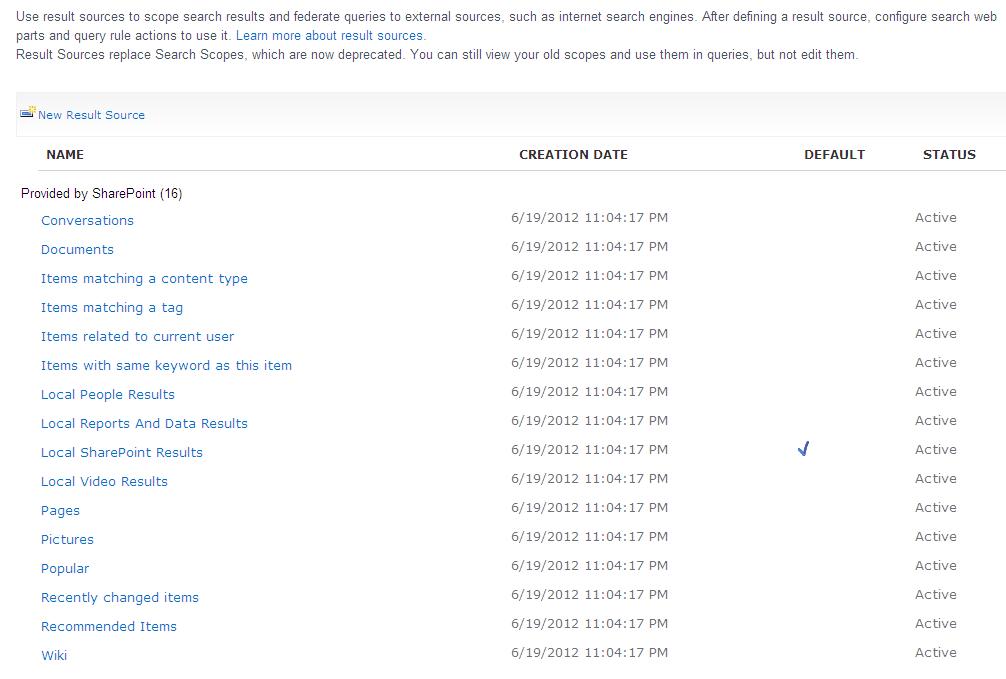
Manage Result Resources - SP2013 replaced search scopes with result sources that includes content source configuration, federated location selection and any query transformation settings using a built in query builder(no more caml query builder). SP2013 boosted its search and is all geared up with webparts driven by search. CQWP is now replaced by Content search webpart that can have a query build on top these sources to fetch results or data.


Manage Query Rules - Rules is also a new name with few settings carried from SP2010 and much more settings. Admins can configure rules on searches and if it matches a corresponding action is taken(like promoting results or ranking). This is where Best bets will be configured as well.

Manage Query Client Types - This feature allows to prioritize the execution of search query based on the type of application the request has come from. Allows to manage query throttling based on the priorities configured here. By default this option is OFF.


Usage Reports - Here admin can see the pre configured reports on search queries that will pull the data in excel format. SP2013 now do not have an analytics service application but integrated and improved as part of search component. Analytics are two types in SP2013

  •  Search Analytics - Analyzes the content on index server to improve the search relavance and for the reports
  •  Usage Analytis - Analyzes user actions/events
  
Subscribe

Saturday, January 19, 2013

Set width of div part of iframe

Share/Save/Bookmark

How to set the width(in percentage) of the element that is part of iframe?
my first attempt :
$(document).ready(function()
{
$("#divid").css("width","50%");
});
Above script did not work as the script gets triggered immediately after document
loads but before iframe renders
So i tried the below, which did not work for me(in IE 8)
$('iframe').ready()
finally i could run the script on load of iframe with below code
though it failed to set the width property as it was not able to find the div
$('iframe').load(function()
{
   $("#divid").css("width","50%");
}

To access the contents of the iframe use
$("iframe").contents().find("#divid")
Geat!! it could get the div element but could not set the css property as i
was trying to override the css property that already has important tag set
So, how do i set my css property as important through jquery?
Here you go...
$("iframe").load(function () {
        $("iframe").contents().find("#divid").attr("style", "width:50%!important");
    });

voila!!So much learnt today :)


 Subscribe